
App widgets
Days to go, today's reviews and your readiness, without opening the app.


Pick your study days and a time. One reminder a day at most, never at night, and none on a day you have already studied.
An illustration of how it works. The numbers are examples.
Choose days and a time between 08:00 and 21:00. It starts on weekdays at 19:00.
Now and then: your exam coming near, a new week's plan, and a nudge after a few days away. Never about a streak.
Your phone schedules the reminders itself. The days and the time you choose stay on it.
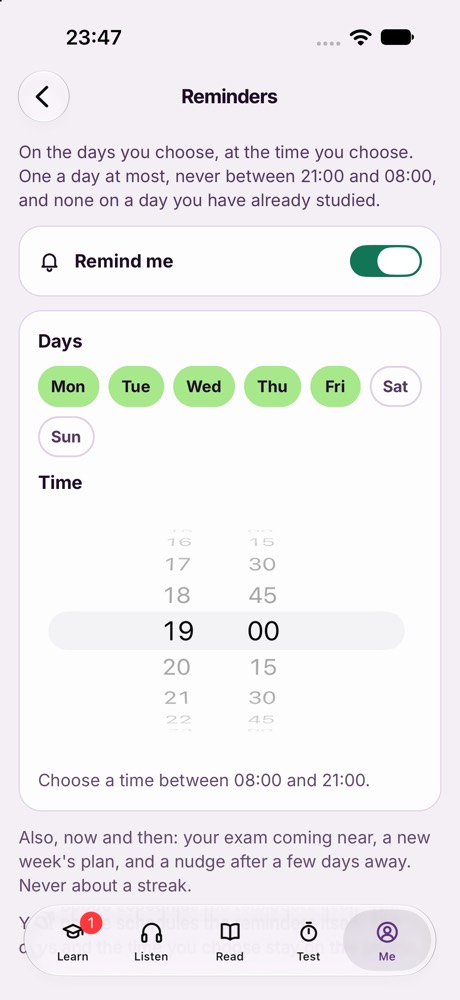
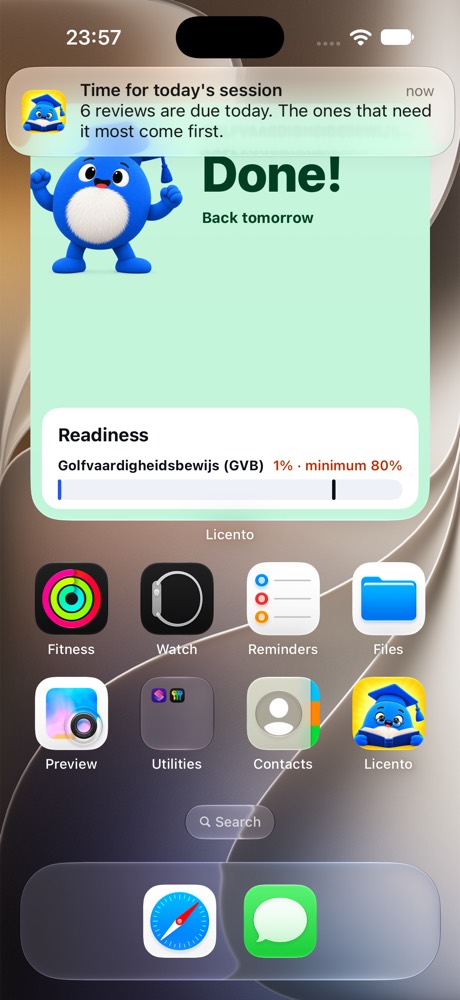
Screens from the app itself, on the Golf GVB exam, which is sat in Dutch.
A paired watch shows the reminder as it does any iPhone notification.
Days to go, today's reviews and your readiness, without opening the app.
Inside an exam, the whole app takes on its colours, its icon and its landscape.
A small blue guide in a graduation cap, who turns up when it counts.